Notices / Create
Create a notice
-
Click New Notice
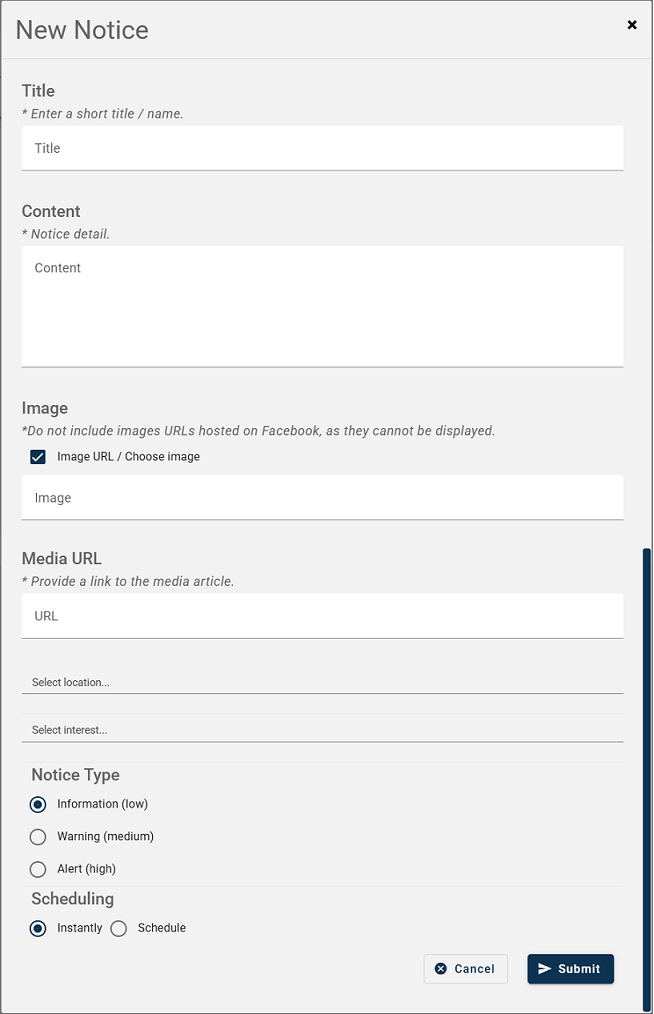
Title - Enter a name for the notice.
Content - Enter the notice details.
Image (Optional) - From a website, copy and paste the image link. Untick 'Image URL / Choose image' to select a downloaded image.
Media URL (Optional) - Include a URL to point to further information on a website.
Select Location (Optional) - Leaving blank will send to everyone. Choosing a location(s) will only send the notice to those citizens who have subscribed to that location(s).
Select Interest (Optional) - Leaving blank will send to everyone. Choosing an interest(s) will only send the notice to those {{ citizens }}s who have subscribed to that interest(s).
Choosing a location and interest will send the notice to those citizens who have subscribed to both.
Notice Type - Choose Low, Medium or High for the notice.
Scheduling - Choose to send instantly or schedule to send out on a certain date and time.
-
Click Submit.