Organization / Community Documents
(Administrators Only)
Note
Requires licensing. The organization must be using MAGIQ Documents.
Configuration of Community Documents (also known as Publishing Portal) provides a secure web based gateway for citizens, clients, councillors and other authorized users to access nominated folders and documents without having direct access to MAGIQ Documents. Alternatively, documents can be accessed publicly such as Council Minutes and Agendas, Council policies.
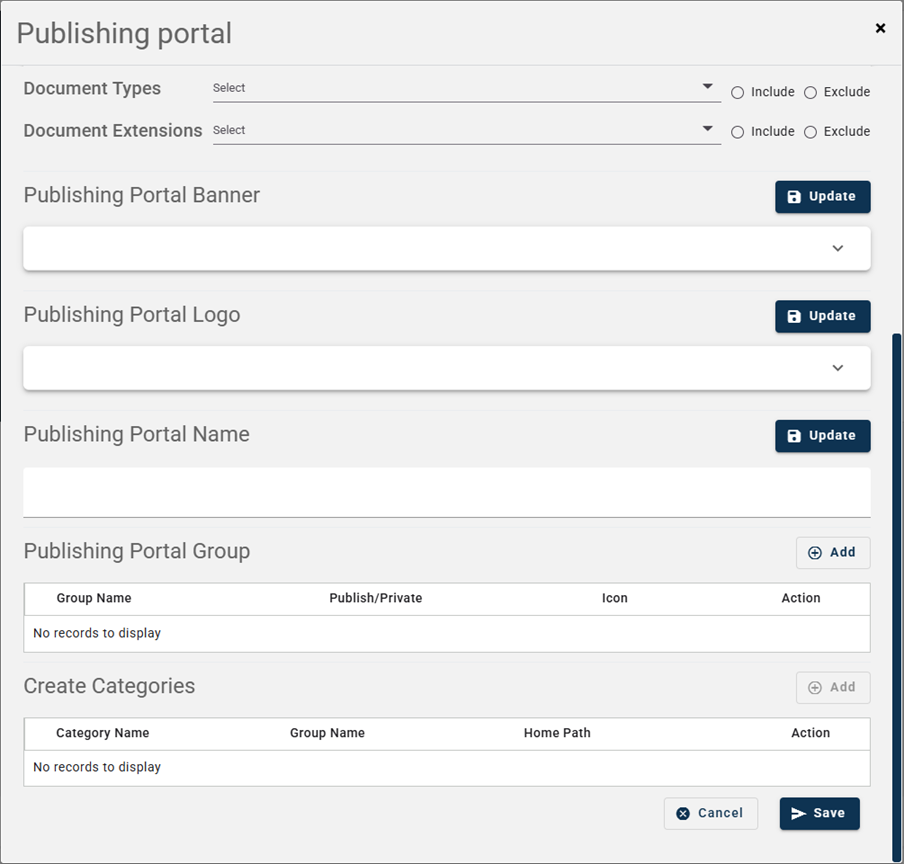
Document Types - Include or Exclude document types from MAGIQ Documents such as correspondence inwards, emails etc.
Document Extensions - Include or Exclude document extensions such as .pdf, .docx, .xlsx etc.
Publishing Portal Banner - Select an image to display as a header, this would be an image that would relate to your website.
Publishing Portal Logo - Select your organization logo, this might need to be white depending on your banner.
Publishing Portal Name - What would you like to call your documents area? For example, Community Documents or perhaps Council Documents.
Publishing Portal Group - These will be the tabs at the top to select relevant documents. For example General Publication or My Documents.
Create Categories - Within each group, what category or menu item would you like to see. For example Minutes and Agendas, Policies.