User Management / Overview
(Administrators Only)
Ability to create and maintain users.
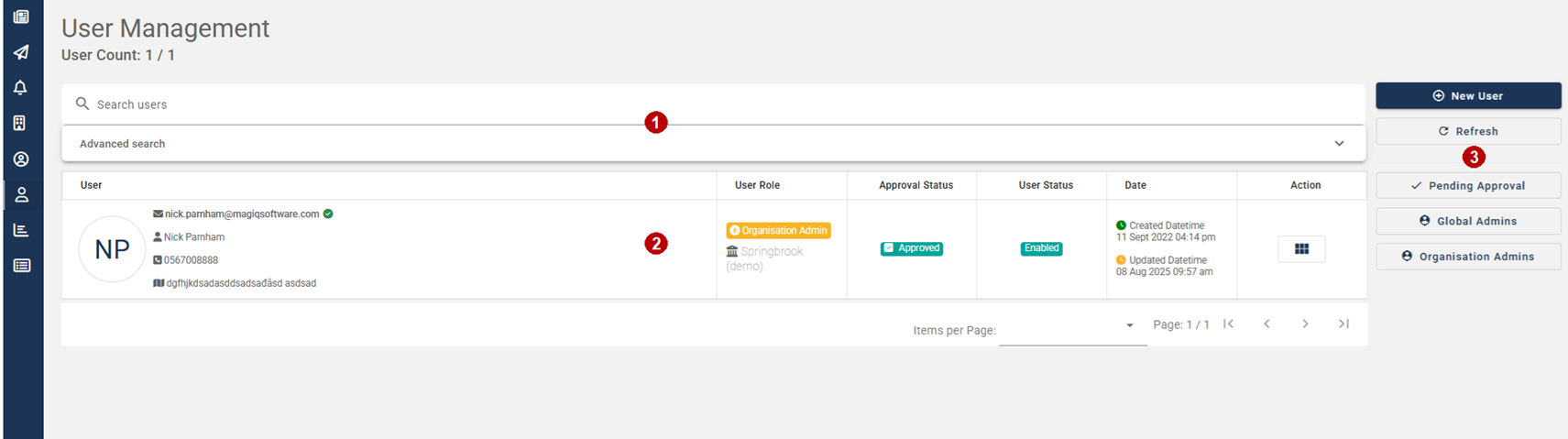
 Search.
Search for users or use the advanced search to search by date created, user roles (guest/user/organization admin), approval status (pending approval/approved/rejected), user status (enabled/disabled) or locations.
 List of users.
There are three roles/types of users, each has varying permissions:
Guest - Anonymous citizens who can belong to an organization to view news, create issues/requests and receive notices without login details.
However, when they choose 'Account' they will need to create an account.
User - A citizen who has been approved by the organization admin. A citizen can do what a guest can do. In future releases of Community Engagement integration with MAGIQ Enterprise will see the citizen being able to conduct property and cemetery searches, ability to deregister an animal or know the amount how much their rate payments are etc.
Organization Admin - A person who can create news articles and notices, maintains the organization including branding, maintains users, approves connections.
 Menu Buttons.
New User - Create a new user.
Refresh - Refresh the screen.
Pending Approval - Display users who are waiting to be approval.
Organization Admins - Display users who are Organization Admins.