Organization / Transparency
(Administrators Only)
Provides financial information to communities/citizens/residents on how monies are being spent by organizations.
Information is generated from reports via Advanced Budgeting.
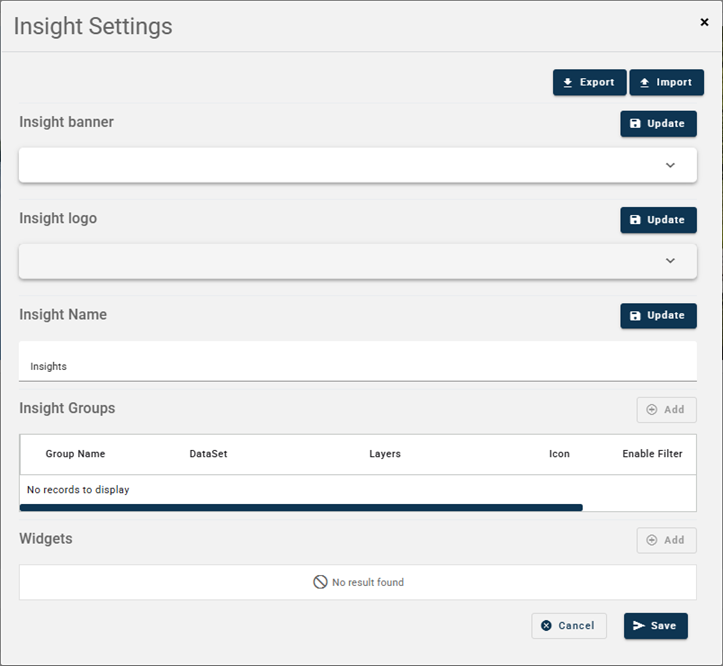
Import - Import settings.
Export - Export settings.
License (Administrator Only) - Turn on Insights. If this is not turned on, Insights will not show in the mobile app.
Widgets Add a widget.
-
Click Add
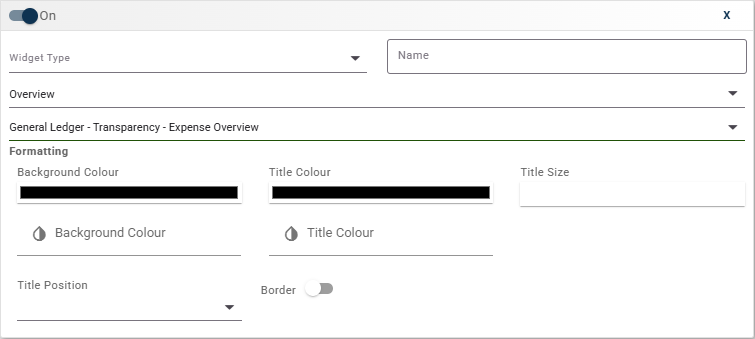
On/Off toggle - enable/disable the widget from being visible on Insights page.
- Select the widget type. (Grid is the equivalent of databrowser).
- Enter a name of the widget.
- Group name - Select a group name. By default the first group is displayed. For example, Overview.
- Screen - Select the report. The report is created in Advanced Budgeting and must have 'Public API' ticked.
- Formatting:
- Background color - select the background color of the widget. To blend in with the webpage background, the hex code is #f2f2f2.
- Title Background - select the title background. To blend in with the webpage background, the hex code is #f2f2f2.
- Title Color - select a title color to stand out. For no title to display use the hext code of #f2f2f2.
- Title Size - what size do you want the title to be.
- Title Position - where do you want to the title to display.
- Border - do you want a border around the widget.
-
Click Save