Menu / My Profile
Update or delete your account, add locations, select interests, choose which page loads first or log out of the app.
To access:
- Tap
 in bottom right corner.
 -
Choose My Profile.
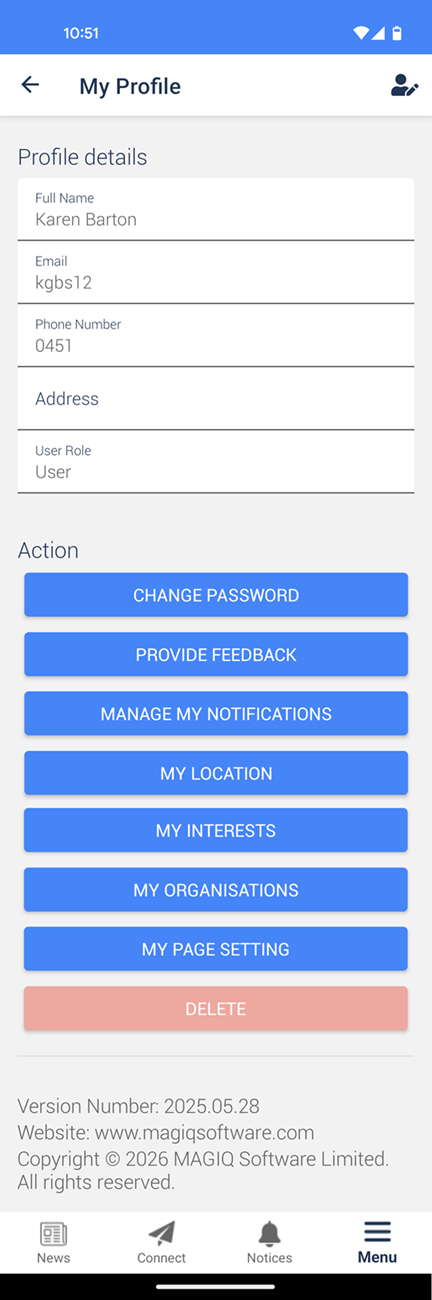
Change Password - Change your password.
Provide Feedback - Send any requests or enhancements to MAGIQ.
Manage My Notifications - Receive Notifications - Toggle off to receive no push notifications. The notice will display under 'Notices'.
My Location - Add/subscribe to locations (areas) that you are interested in.
My Interests - Select which interests you want to be notified about.
My Organisations - Display the list of organisations that you have subscribed to. Tap Unsubcribe to leave the organisation. Push notifications will not be sent to the citizen for the sixth organisation, if the citizen has already subscribed to 5 organisations.
My Page Settings - Select which page you want to display when you first open the app.
Delete - Delete your account.
To edit your details
- Tap
 in top right corner.
 - Make relevant changes.
- Tap Save.